Hackers Of Cyber Lake

A Basic Platform for Begineers to be an Advance level Hacker/Security Administrator. !

Hackers Of Cyber Lake

A Basic Platform for Begineers to be an Advance level Hacker/Security Administrator. !

Hackers Of Cyber Lake

A Basic Platform for Begineers to be an Advance level Hacker/Security Administrator. !

Hackers Of Cyber Lake

A Basic Platform for Begineers to be an Advance level Hacker/Security Administrator. !

Hackers Of Cyber Lake

A Basic Platform for Begineers to be an Advance level Hacker/Security Administrator. !

Showing posts with label Android Hacking. Show all posts

Sunday, 28 December 2014

How to Hack any Android, iPhone and Blackberry Mobile

How to Hack any Android iPhone Blackberry How to Hack any Android, iPhone and Blackberry Mobile
The most effective method to Hack any Android iphone Blackberry How to Hack any Android, iphone and Blackberry Mobile

Today, i'm discussing how to hack any Android, iphone and Blackberry cellular telephone. Meets expectations, a considerable measure like your normal RAT. You may arrange a Xampp; server on your machine and once individuals introduce your application you can control them from your own telephone. You can read all there messages, contacts and get shell access.

Lets begin,

NOTE: whatever is left of the excercise will be for Android telephones, yet can undoubtedly be designed to hack Iphone/Blackberry's as well. my Android Phone)

Prerequisites:

1. Backtrack 5 r3 (utilizing backtrack for this sample as SPF is preinstalled), i as of late posted an article, how to download, introduce and run backtrack 5 in windows.

2. Portforwarding (on the off chance that you are utilizing this outside of your own system)

3. Xampp for linux (manual for introducing this will be in the excercise)

4. A telephone (for instance I will be utilizing my Android Phone)

Step 1) Installing Xampp:

Most importantly, go Here to get Xampp.

Once xampp has got done with downloading, go to your home registry and you ought to have a record called "download.php?xampp-linux-1.7.3a.tar.gz" rename it to something like "xampp.tar.gz".

In your terminal window run

tar xvfz xampp.tar.gz -C/pick

Everything ought to be introduced and you can discover xampp in/pick/lampp/registry.

Step 2) Configuring Xampp:

Utilization

/pick/lampp/lampp begin

/select/lampp/lampp stop

To begin and stop the Xampp administration

Once Xampp has begun, go to "localhost" in your program and select your dialect. Explored to "Phpmyadmin" and make another database called "system".

Next include another client by setting off to the "benefits" tab then "include another client".

Utilize whatever username and secret word you need and select "neighborhood" from the hosts list.

Verify you "Check All" worldwide benefits, then click go.

Presently erase the htdocs organizer in/pick/lampp/

Step 3) Configuring SPF Files:

Explore to the SPF config document

/pentest/misuses/cell phone pentest-system/frameworkconsole/configand Replace

Ip Address For Websrever – with your nearby/open ip.

Ip Address TO Listn on for Shells – with your nearby/open ip.

Ip Address of SQL Server 127.0.0.1 if Localhost – with 127.0.0.1

Username of the MYSQL User to utilize – with the username you made in phpmyadmin

Watchword of the MYSQL User to utilize – with the secret key of the client you set.

Step 4) Configuring SPF:

Open up the cell phone pentest-structure window by going to:

applications>backtrack>exploitation tools>wireless abuse tools>gsm exploitation>smartphone-pentest-structure.

Select choice 4 then select alternative 2.

Info your telephone number, then enter a 7 digit control key to unite with your victimized people and afterward enter the way you need your application to found on your webserver (I will be utilizing/). Presently don't anticipate that anything will happen simply yet, you have to design your telephone with SPF.

Place the document:

/pentest/abuses/cell phone pentest-structure/Frameworkandroidapp/canister/Frameworkandroidapp.apk

What's more move it over to your telephone by transferring it to dropbox or simply associating your telephone to your machine.

Introduce it then open it up. Put in the subtle elements you rounded out a moment prior in

SPF and your ip the webserver is setup on and press setup.

Step 5) Attacking People:

Open up cell phone pentest-system and select choice 6 then pick between the immediate download (simply sends a content to the individual from your telephone with an immediate download to the record) or customer side shell (utilizes a program misuse as a part of android telephones to provide for you shell access).

In the event that you choose alternative 1 you must move the record

/pentest/misuses/cell phone pentest-structure/Androidagent/receptacle/Androidagent.apk

To your root index.

When you get a victimized person, simply open up cell phone pentest-structure once more, select choice 1, fill in the subtle elements and you can then control the victimized person from your cellular 

Sunday, 14 December 2014

Make WhatsApp Free For Lifetime only for Android !

1: Uninstall whatsapp,if your trial variant is done, or you need

to develop it for a year.

2: Go to gmail application and

make another gmail id.

Friday, 28 November 2014

Cut Anyone's Internet Connection in LAN..!!!

Netcut- A Tool To Cutoff Bandwidth On Wifi Or LAN "Windows Hacking" is the Keyword that is most searchable on the google but you can not find out working hacks from that. 

Netcut is a tool that can be used to cutoff anyone's internet connection in Wi-Fi or LAN.

 It is very useful while you want to download big but there is lots of users on your wifi. you can block all of them's internet and get full bandwidth. 

Just Download the tool given below Download Link:- http://sh.st/r6V9f

Wednesday, 30 July 2014

Hack any softwere for LIFETIME use..!!


Hello there, I am back today with a most usefull article..

Trust every one of you will Like It ! Here i will demonstrate to you that "Industry standards to Hack Softwares to utilize them Forever ?" . That truly a helpful article,because in our day by day life we require thousand of programming projects today,which of most are profoundly paid..so how to utilize them Freely for entire Like ??


Runasdate is a little utility that permits you to run a project in the date and time that you determine. This utility doesn't change the current framework date, yet it just infuses the date/time that you tag into the craved application.


Download RunAsDate v1.10

Catches the piece API calls that gives back where its due date and time (Getsystemtime, Getlocaltime, Getsystemtimeasfiletime), and replaces the current date/time with the date/time that you specify.it lives up to expectations with Windows 2000, XP, 2003 and Vista.

NOTE: FOLLOW THESE TIPS CAREFULLY

You need to take after these tips deliberately to effectively hack a product and make it run in its trial mode for eternity.

1. Note down the date and time, when you introduce the product shockingly.

2. Once the trial period lapses, you should dependably run the product utilizing Runasdate .

3. After the trial period is terminated, don't run the software(program) directly.if you run the product straightforwardly even once, this hack might no more work.

4. It is better and protected to infuse the date of the most recent day in the trial period.


Case in point, if the trial period lapses on oct 1 2009, dependably infuse the date as sep 30 2009 in the Runasdate.

Thursday, 17 July 2014

How to Bypass Android Pattern lock with Different 7 Method

Bypass Android Pattern lock

System 1 : 

Answer For Everyone With Recovery (Cwm, Twrp, Xrec,etc...) Installed: 

Guidelines: 

1. Download this zip Pattern Password Disable (Download from connections) on to your sdcard 

(utilizing your PC, as you cant get into your telephone, right ) 

2. Embed the sdcard into your telephone 

3. Reboot into recuperation mode 

4. Streak the zip 

5. Reboot 

6. Done! 

Note : If You See The Gesture Pattern Grid Or Password After Restarting, Don't Worry. Simply Try Any Random Pattern Or Password And it Should Unlock. 

System 2 : 

Answer For Everyone Without Recovery Installed - ADB : 

What You Need: 

=>a machine running a Linux distro or Windows+cygwin 

=>usb link to interface your telephone to the PC 

=>adb introduced 

Instructions to introduce adb: 

1. Open Terminal 

2. Sort: 

Code: 

"sudo able get introduce android-devices adb" 

-> Hit [enter] 

3. Take after the directions until everything is introduced. 

Directions: 

1. Interface you (turned on) Phone to the Computer by means of USB. 

2. Open a terminal window. 

3. Sort: 

Code: 

adb gadgets 

adb shell 

compact disc information/framework 

su 

rm *.key 

4. Done...now You Just Have To Reboot. 

Note : If You See The Gesture Pattern Grid Or Password After Restarting, Don't Worry. Simply Try Any Random Pattern Or Password And it Should Unlock. 

System 3 : 

Answer For Everyone Before Lock Accident : 

SMS Bypass - Download Link - Install It On Your Device (Download from connections) 

This App Allows You To Remotely Bypass Your Phone's Screen Lock By Sending A SMS. 

It Removes Your Gesture Pattern Or Password After Receiving A Preset Keyword Along With A Secret Code Via SMS. 

SMS Bypass App Requires Root. 

Guidelines: 

1.first, make beyond any doubt you give lasting root access to the application. 

2.change the mystery code to your favored decision. The default secret key is : 1234 

3.to reset your screen lock, send the accompanying message from an alternate telephone: 

Code: 

secret_code reset 

Sample: 

Code: 

1234 reset 

Note 1 : There is a space between your mystery code and reset. Likewise the mystery code is case delicate. 

Note 2 : There is a choice accessible to change the preset essential word. Default is : reset - Your telephone will restart and your lock screen will be reset. 

Note 3 : If You See The Gesture Pattern Grid Or Password After Restarting, Don't Worry. Simply Try Any Random Pattern Or Password And it Should Unlock. 

Technique 4 : 

Answer For Everyone Via Adb - SQL Command : 

Guidelines: 

=>type This Commands Separated In Your Terminal (CMD Prompt) : 

Code: 

adb shell 

cd/information/information/com.android.providers.settings/databases 

sqlite3 settings.db 

upgrade framework set value=0 where name='lock_pattern_autolock'; 

upgrade framework set value=0 where name='lockscreen.lockedoutpermanently'; 

.stopped 

=>now You Just Have To Reboot. 

Note : If You See The Gesture Pattern Grid Or Password After Restarting, Don't Worry. Simply Try Any Random Pattern Or Password And it Should Unlock. 

Strategy 5 : 

Answer For Everyone Via Adb - File Removal : 

Directions: 

=>type This Command In Your Terminal (CMD Prompt) : 

Code: 

adb shell rm/information/framework/gesture.key 

Note : If You See The Gesture Pattern Grid Or Password After Restarting, Don't Worry. Simply Try Any Random Pattern Or Password And it Should Unlock. 

Strategy 6 : 

Answer For Everyone With USB Debugging Enabled : 

Directions: 

Essential Step for all strategy: 

Download & Extract to anyplace - Bypass Security Hack (Download from connections) 

Open Sqlite Database Browser 2.0.exe in Sqlite Database Browser. 

Run pull settings.db.cmd inside By-pass security Hacks organizer to haul out the setting document out of your telephone. 

Drag settings.db and drop to Sqlite Database Browser 2.0.exe system. 

Explore to Browse information tab, At table there, click to rundown down the choice & selete secure 

Guideline To Remove Pattern Lock: 

Presently, discover lock_pattern_autolock, Delete Record 

Close & spare database 

Run push settings.db.cmd and reboot your telephone 

Guideline To Remove PIN Lock: 

Presently, Find Or Create lockscreen.password_type, twofold click & change its esteem to 65536, Apply changes! 

Presently, discover lock_pattern_autolock, Delete Record, If doesn't exist, Ignore 

Close & spare database 

Run push settings.db.cmd and reboot your telephone 

Guideline To Remove Password Lock: 

Presently, discover lockscreen.password_salt, Delete Record 

Presently, discover lockscreen.password_type, Delete Record 

Close & spare database 

Run push settings.db.cmd and reboot your telephone 

Note : If You See The Gesture Pattern Grid Or Password After Restarting, Don't Worry. Simply Try Any Random Pattern Or Password And it Should Unlock. 

System 7 : 

Answer For Everyone With Recovery Installed : 

Guidelines: 

1.download and Copy Aroma File manager.zip (Download from connections) to your memory card. 

2. Open your recuperation (press volume Down + Power catch or it can be diverse as indicated by the telephones. 

By and large the telephones who have press capable catch on the center they need to press every one of the three catches. Google for you design there are parts) 

3. There'll b a choice in recuperation called "mount". Go in that choice and afterward mount all the store and all that it is there. 

4. At that point select "overhaul" and select "apply redesign from SD/outer" and select fragrance record manger.zip document that you downloaded utilizing above QR code above. 

5. In the wake of Flashing or overhauling, the fragrance record trough will open. Use volume keys for up/down and force catch 2 select like you use to get into recuperation. 

6. In fragrance File supervisor , Go to menu , which is placed in base strip and afterward select Settings. 

7. Go to base n select "mount all segment in startup " then passageway from smell record trough. 

8. Presently after passageway , re-upgrade that smell record again and it will open once more. 

9. Go to information >> and after that System. 

At that point find "gesture.key" (for example lock) and 

Saturday, 12 July 2014

How to Find last System Boot time in CMD...@

  Step 1: Click on begin catch 

Step 2: Open CMD with Administration authorization 

Step 3: Type "systeminfo" (without "") then Hit Enter 

Systeminfo :- 

Showcases point by point design data around a machine and its working framework, including working framework arrangement, security data, and item ID, and equipment properties, for example, RAM, plate space, and system cards. 

Keep joined for more upgrade..!

Tuesday, 8 July 2014

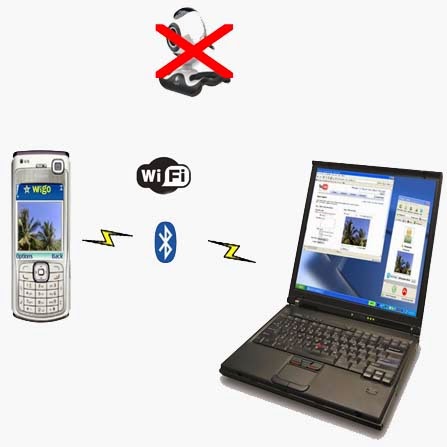
How To Use Mobile Camera As A WebCam..

        -: How To Use Mobile Camera As Real WebCam :-                                     

Dear My Blog's perusers today I am going to let you know How To Use Mobile Camera As A Webcam


Step1:- Install Windows [exe] (Smartcam.exe on your PC and Install) 

Step2:- Install Smartcam on your Mobile (Symbian S60 second Edition [sis], S60 second Edition, JME [jar], Windows Mobile [cab], Android [apk] 

Step3:- Start up Smartcam on your PC and go to >>> File >>> Settings and check your association and continue >>> next step. 


Step4:- Start Smartcam on your telephone and go to >>> Options >>> Connect and it will approach you for server name and you have to sort your PC IP address or your framework name


Know your Ip addresh like this --

1. Go to RUN
2. Type CMD
3. Type IPCONFIG

Monday, 7 July 2014

Surf Web-Site without Internet Connection..!!


HTTrack is a free and open source Web crawler and offline browser, developed by Xavier Roche and licensed under the GNU General Public License.

It allows one to download World Wide Web sites from the Internet to a local computer. By default, HTTrack arranges the downloaded site by the original site's relative link-structure. The downloaded (or "mirrored") website can be browsed by opening a page of the site in a browser.

Steps

  1. Use HTTrack Step 1 Version 2.jpg
    1
    Type httrack
  2. Use HTTrack Step 2 Version 2.jpg
    2
    Choose a project name (this will be the name of the folder containing the project). This can include multiple websites.
  3. Use HTTrack Step 3 Version 2.jpg
    3
    Optionally enter a base path (the default will store the project in a websites directory in your home directory).
  4. Use HTTrack Step 4 Version 2.jpg
    4
    Enter the URL(s) of the websites you want to mirror (separated by commas or spaces).
  5. Use HTTrack Step 5 Version 2.jpg
    5
    Choose an action by typing its number.
    • Mirror website
    • Mirror website with wizard
    • Just get files indicated
    • Mirror all links in URLs
    • Test links in URLs
    • Quit
  6. Use HTTrack Step 6 Version 2.jpg
    6
    Optionally enter a proxy.
  7. Use HTTrack Step 7 Version 2.jpg
    7
    Optionally define wildcards.
  8. Use HTTrack Step 8 Version 2.jpg
    8
    Optionally define additional options, such as recurse level.
  9. Use HTTrack Step 9 Version 2.jpg
    9
    Confirm you are ready to launch the mirror.
  10. Use HTTrack Step 10 Version 2.jpg
    10
    Congratulations, it will now begin mirroring - be patient until it reports the mirroring as completed!

Sunday, 6 July 2014

Free Download Automatic Call Recorder PRO..!!!!

Auto Call Recorder Pro 3.5 APK


Requirements: Android 2.1 and up
Size: 375 KB
Rating: 3.5/5
Type: Tools


App Review:
Auto Call Recorder Pro allows users to choose between automatic call recording for all the calls that they receive or from the users who are not there on your contact list or no recording at all if you do not feel the need of it. The application also provides a variety of options in terms of audio formats for compatibility and higher sound quality as well; plus users can choose where they need to save the files or recording for easy discovery later on. 
The biggest benefit of Auto Call Recorder is that it allows users to see the recording in a list all inside the application interface for sorting and saving. Although there is a limit of 100 call recordings in the free version but that is more than sufficient for important messages plus users can always buy it pro version if they need more support and features. 
One of its best features is the Dropbox integration that allows users to save all the recording on the cloud storage so that if the need be to share the recording with a group of people they can easily do it using the power of cloud. Read more at themobileindian.com 
Features at a glance:
- automatically save calls from a contact and add comment to a recorded call.

- stop a recording in progress or start recording when a call is in progress.

- Record all desired calls on your phone.
- Select which calls to record:
- Record all calls or only those that are from numbers that are not in your contacts.
- Play, save and share the recorded calls.
- Auto call recorder also supports wav , ANR, 3gp formats.
- Recording on an external sd card or any location desired is also possible.
- The audio source is now configurable.
- For playing the 3gp format you can use the “MX Video Player”.

If you have a problem with the recording, please try to record with a different audio source, which you can configure in the settings tab.
Try to record with speaker on or off , until you find the best combination for your phone.
For example you can try Audio Source -> Voice UpLink and speaker off.

Free download of Auto Call Recorder Pro 3.5 APK (ad free) is available at the end of this post.

What’s new in this version ---

- Show subject in call lists – activate in settings.

- Search in subjects too.

- Improved UI for devices without hardware menu button.

- Bug fixes.

Screenshots (click to enlarge)

Auto Call Recorder Pro 3.5 Apk Download Links:

Download from here..---